
Remote-control receiver
Receiver specifications:
- Operating voltage: 5.0 V ±10%.
- Rated power: 12 mW.
- Reception frequency: 38 kHz ±3%.
- Wavelength: 940 nm.
- Reception range: up to 8 m.
Remote control
Remote-control specifications:
- Operating voltage: 3 V.
- Range: up to 8 m.
- Frequency: 38 kHz.
Overview
A remote control (RCU) is an electronic device for controlling another electronic device from a distance.
Robotrack kit remotes use infrared radiation to transmit signals, like most household remotes for TVs and air conditioners. Infrared signals reflect well off walls, so they work well indoors but poorly outdoors or in sunny conditions, where sunlight can overwhelm the remote’s signal. The signal travels in a straight line and is easily blocked by objects, including glass that is transparent to visible light. Keep your fingers away from the infrared LEDs at the top edge of the remote.
The remote-control receiver is an infrared-photodiode sensor that receives signals from the remote. Position it on the robot so that the receiver is obstructed as little as possible. Horizontal placement is recommended, with the receiving side facing upward.
Using the remote
Setting the channel
The remote can use one of 8 independent channels, allowing up to 8 remotes to be used in the same room. For the robot and remote to work together, they must be set to the same channel. One remote controls all robots in the room set to its channel. Likewise, if multiple remotes use the same channel, each robot receives signals from all of them.
Set the remote channel as follows:
Configure the controller in software with the IRRC_setup block (see Programming).
Connecting
The receiver uses a standard 3-pin connector and plugs into any IN port on the Trackduino controller.
Programming
The blocks for infrared remote control are in the IR Remote block group:
| Block and generated function | Description |
|---|---|
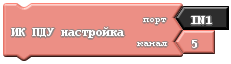 IRRC_setup(int port, int channel); | Assigns the receiver port and sets the channel. Port ( int port): IN1–IN8 input connected to the receiver.Channel ( int channel): remote channel used by the robot. |
 RC(OFF_KEY) | Returns TRUE when no remote button is pressed. |
 RC(UP_KEY) | Returns TRUE when UP is pressed. |
 RC(DOWN_KEY) | Returns TRUE when DOWN is pressed. |
 RC(LEFT_KEY) | Returns TRUE when LEFT is pressed. |
 RC(RIGHT_KEY) | Returns TRUE when RIGHT is pressed. |
 RC(UP_AND_LEFT_KEY) | Returns TRUE when UP and LEFT are pressed together. |
 RC(UP_AND_RIGHT_KEY) | Returns TRUE when UP and RIGHT are pressed together. |
 RC(DOWN_AND_RIGHT_KEY) | Returns TRUE when DOWN and RIGHT are pressed together. |
 …  RC(F1_KEY) … RC(F6_KEY) | Returns TRUE when the corresponding F1–F6 button is pressed. |
Example project
Remote control: move forward and backward
Generated code:
void setup()
{
  IRRC_setup(IN1, 1);
}

void loop()
{
  if (RC(OFF_KEY))
  {
    stopMotor(1);
    stopMotor(2);
  }
  if (RC(UP_KEY))
  {
    startMotor(1, 100);
    startMotor(2, 100);
  }
  if (RC(DOWN_KEY))
  {
    startMotor(1, -100);
    startMotor(2, -100);
  }
}