Robotrack AI educational solutions
Artificial intelligence and neural network technologies
A unified learning pathway: from first projects with ready-made neural networks to independently creating, training, and using AI models.
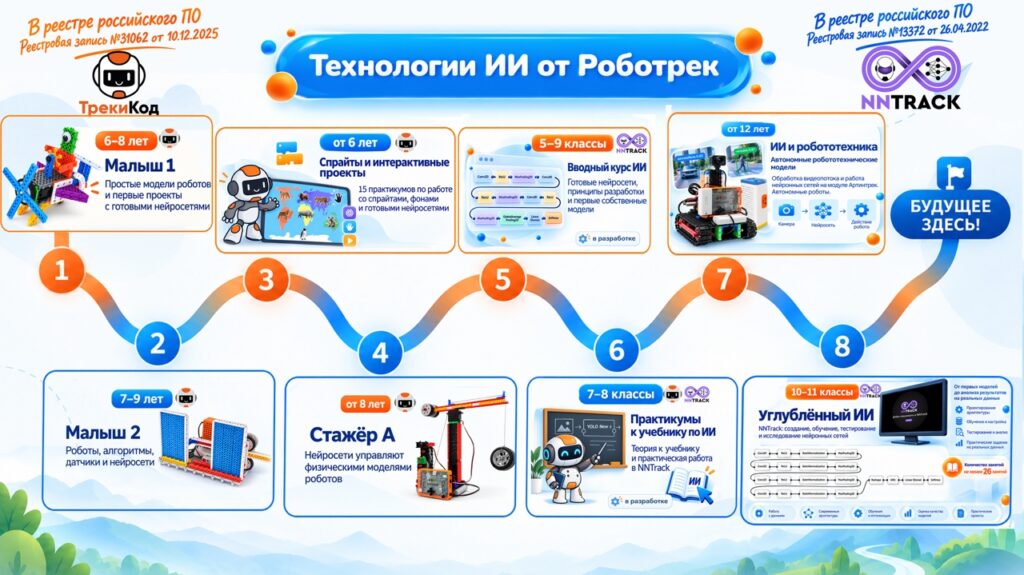
| Core idea Learning follows a gradual progression: virtual projects and simple robotic models, using ready-made neural networks, experimenting with data, creating custom models in NNTrack, running neural networks autonomously on robots, and applying them in UAS projects. Each program can be used as part of a unified learning pathway from simple to advanced, or as a standalone course. |
|---|
Robotrack software and hardware solutions
The product line brings together several software environments, teaching materials, and robotics equipment. This makes it possible to study artificial intelligence both in a computer lab and through projects with physical robot models and unmanned aircraft systems (UAS).
Software suite
The courses use Trekikod and NNTrack. Depending on the course, students work in one environment or use both together. In Trekikod, they create projects with sprites and backgrounds and use ready-made neural networks to control virtual characters and robotic models. In NNTrack, they study machine-learning principles and then create, train, and test their own neural network models.
Some courses combine the two programs: a neural network is created and trained in NNTrack, then used in Trekikod to control sprites or physical robots, change backgrounds, and trigger other project actions. A computer lab is sufficient for the software activities; robotics equipment is added in courses and workshops that use physical robot models.
Software and hardware suite
- Robotrack educational kits and the Trekikod and Robotrack IDE environments are used for hands-on work with robotic models. In Trekikod, ready-made neural networks can control physical models built with Robotrack kits.
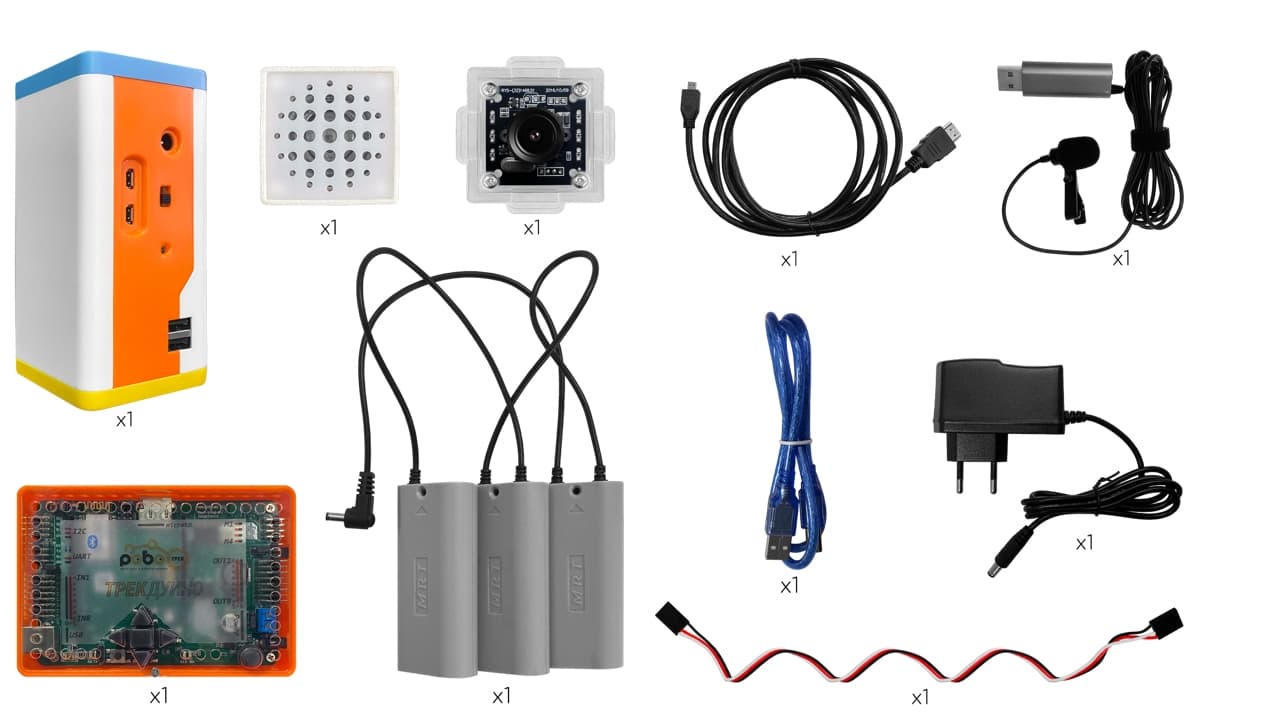
- Ready-made or pretrained neural networks can run on the Artintrek computing module. The network then runs directly on the robot: the module receives camera data, processes it, and sends the result to the controller to perform an action. This makes it possible to build autonomous robotic systems that recognize objects and make decisions without a continuous computer connection.
- Neural networks trained in NNTrack can also be integrated with programmable quadcopters and UAS to analyze camera data and perform autonomous actions.
Software
| Environment | Purpose |
|---|---|
| Trekikod | Visual programming for sprites, backgrounds, and physical robots; creating interactive projects; and using ready-made or NNTrack-trained networks to control them. |
| Robotrack IDE | Programming physical robotic models and working with the controller and actuators in the AI and robotics course for students aged 12 and over. |
| NNTrack | Visual design of neural network architectures, training, testing, analysis, and export. Works with images, tabular data, and audio. |
Learning pathway
The pathway covers several age groups. Younger learners see a clear result from a ready-made neural network. Later, they experiment, work with data, and build their first models. In upper grades, students go through the full neural network development cycle and use their models in software, robotics, and unmanned systems.
| Level | What students do |
|---|---|
| 1. Ages 6–8: Malysh 1 | Build simple robot models, learn their first algorithms, and create first projects with ready-made neural networks. |
| 2. Ages 7–9: Malysh 2 | Work with 10 models and 20 workshops. Control models with algorithms, sensors, gestures, voice, and other neural network outputs. |
| 3. From age 6: Sprites and interactive projects | Complete 15 workshops with sprites, backgrounds, and ready-made neural networks, arranged in three blocks of five. |
| 4. From age 8: Stazher A | Complete 27 robot-programming workshops and five workshops in which neural networks control physical robot models. |
| 5. Grades 5–9: Introductory AI course (in development) | At least 20 lessons introduce core concepts and neural network development through practical and game-based activities. Students use ready-made networks for gesture recognition and object detection, control video game characters, and then begin building their own models. |
| 6. Grades 7–8: AI textbook workshops | Complete 10 versatile workshops that connect textbook theory with hands-on work in NNTrack and Trekikod. |
| 7. From age 12: AI and robotics | Use Robotrack IDE, the Basic Advanced kit, and Artintrek to build physical robot models, create autonomous robot scenarios, and process video on the robot with neural networks. |
| 8. Grades 10–11: Advanced AI | Complete at least 26 NNTrack lessons on creating, training, testing, exporting, and investigating neural networks. |
1. Malysh 1, ages 6–8
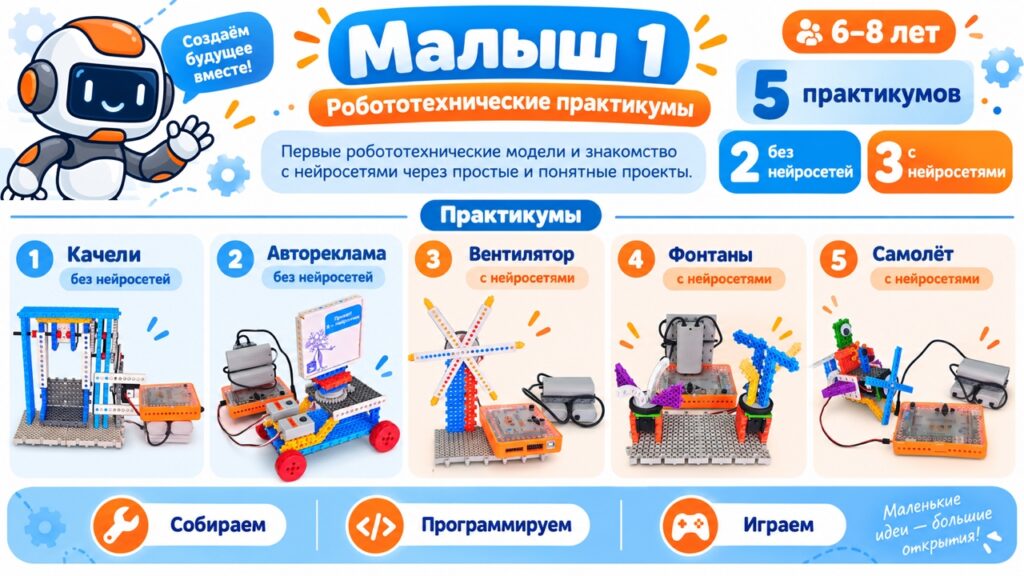
This course supplements a 45-lesson introductory robotics course and provides a first introduction to algorithms and simple applications of artificial intelligence. Children build models from a kit, run a program, observe the mechanism, and see how a ready-made neural network can provide another way to control it.
| Model | Hands-on activity |
|---|---|
| Swing | A basic model-control algorithm. |
| Car advertising display | Working with the model and program; a neural network is optional. |
| Fan | A workshop using a ready-made neural network. |
| Fountains | Control the model with a gesture-recognition network. |
| Airplane | A scenario using a face-recognition network. |
| Equipment | Recommended quantity for a group of 10 | Description |
|---|---|---|
| Robotrack Malysh 1 robotics kit, Russian Ministry of Industry and Trade registry extract No. 10587206 | 5 | Malysh 1 is a kit for building simple robot models and learning the basics of algorithms. |
| Trekikod software, Russian Ministry of Digital Development registry extract No. 31062 | Included with the kit at no extra charge | Trekikod is a visual environment for block programming, working with sprites, and controlling robots. |
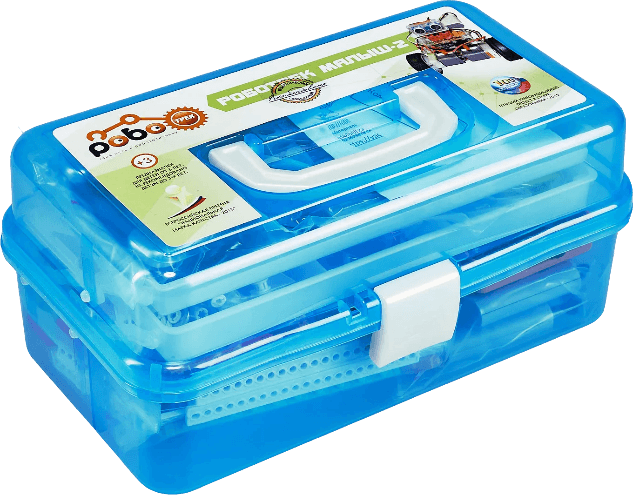
2. Malysh 2, ages 7–9
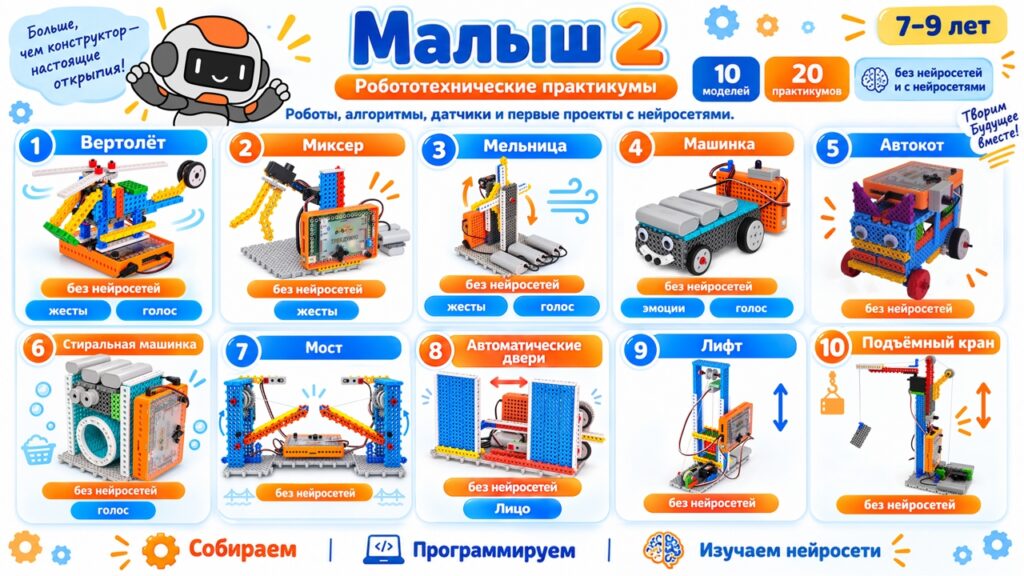
The course includes 20 workshops for 10 robot models. Students build robots from examples or their own designs, create control algorithms, connect sensors, and use ready-made neural networks in some projects. Each model can be explored in several ways: basic program control or control using neural networks that recognize gestures or voice commands.
Course models
| Model | Activities |
|---|---|
| Helicopter | Standard program, gesture control, or voice control. |
| Mixer (with a servo motor) | Basic control algorithm. |
| Windmill | Standard program, gesture control, or voice control. |
| Car | Standard program, emotion recognition, or voice control. |
| Auto-cat | Basic control algorithm. |
| Washing machine | Basic algorithm and voice control. |
| Bridge | Basic control algorithm. |
| Automatic doors | Basic control algorithm. |
| Elevator | Basic control algorithm. |
| Crane (with a servo motor) | Basic control algorithm. |
| Course principle Students learn how algorithms work and use ready-made neural networks as an additional way to control robots. Neural networks complement programming and expand what a project can do. |
|---|
| Equipment | Recommended quantity for a group of 10 | Description |
|---|---|---|
| Robotrack Malysh 2 robotics kit, Russian Ministry of Industry and Trade registry extract No. 10587207 | 5 | Malysh 2 is a kit for learning maths, algorithms, and introductory programming with robot models. |
| Trekikod software, Russian Ministry of Digital Development registry extract No. 31062 | One license included with each kit at no extra charge | Trekikod is a visual environment for block programming, working with sprites, and controlling robots. |
3. Sprites and interactive projects, from age 6
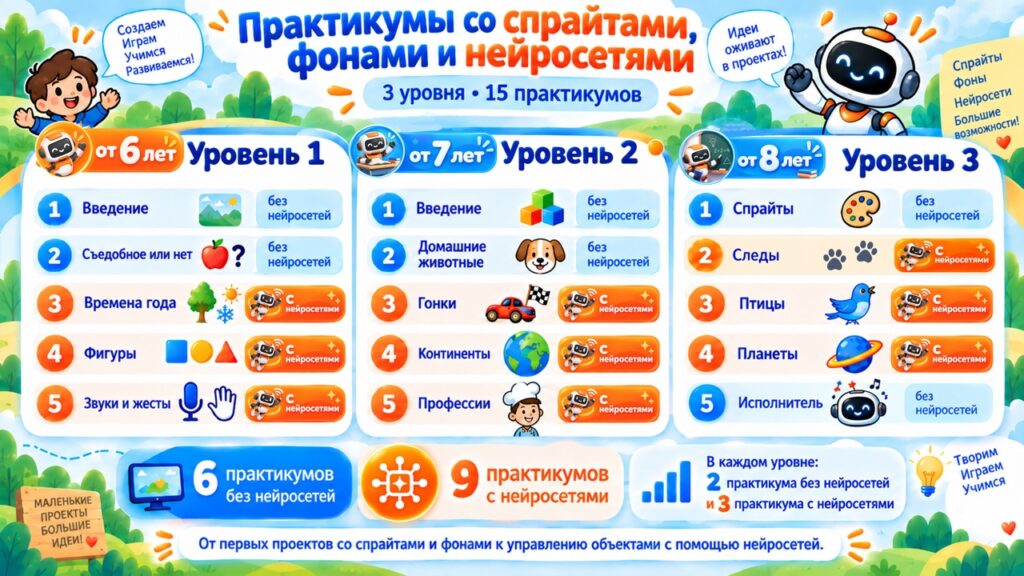
The course includes 15 workshops in three blocks of five. Each block has two workshops on sprites and backgrounds and three that use ready-made neural networks. Students first learn about scenes, events, coordinates, and object interaction, then add intelligent control.
Hands-on activities
- Create sprites and set up backgrounds.
- Control characters with events, the keyboard, and conditions.
- Use coordinates, messages between sprites, and show or hide objects.
- Add ready-made neural networks for speech, gesture, head-position, and other recognition tasks.
- Use a network's output as a condition that changes a sprite's or scene's behavior.
Project examples
Workshops use educational and game-based scenarios: identifying animal tracks, sorting objects into groups, controlling characters by head position, voice commands, projects about professions, and other interactive activities. The program responds to recognition results and runs a predefined algorithm.
| Software | Licenses | Description |
|---|---|---|
| Trekikod software, Russian Ministry of Digital Development registry extract No. 31062 | One license per workstation (PC); the recommended quantity matches the number of PCs at the institution | Trekikod is a visual environment for block programming, working with sprites, and controlling robots. |
4. Stazher A, from age 8
This course supplements a 75-lesson introductory robotics course. At this level, neural networks become a primary way to control physical models. Each workshop uses a ready-made AI model: students build a robot, control it using neural network data, connect the output to an algorithm, and test the mechanism on a real device.
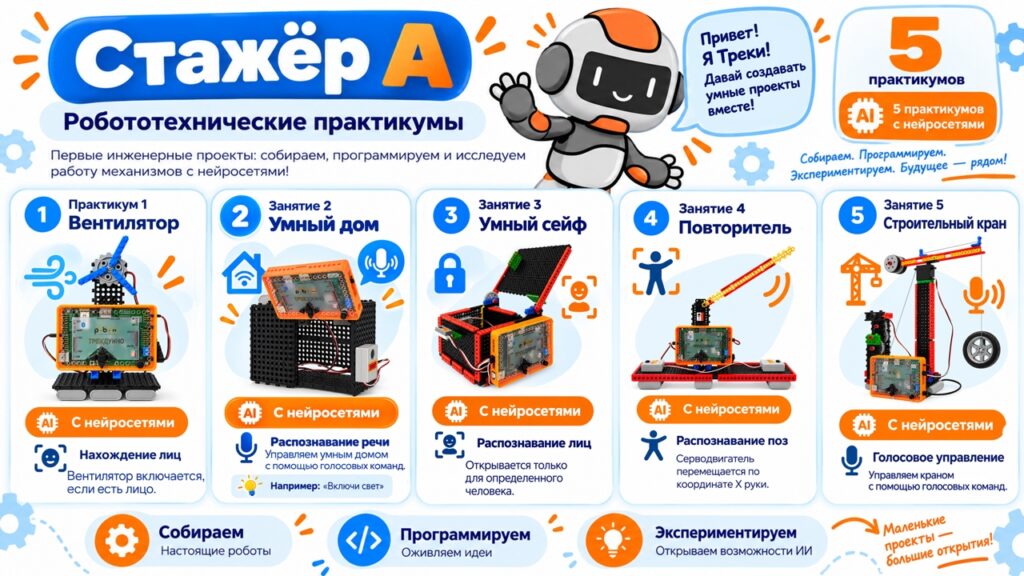
Neural network workshops
| Workshop | Technology |
|---|---|
| Fan | The model responds when a face is detected. |
| Smart home | Control by a recognized voice command. |
| Smart safe | Unlock when a specified face is recognized. |
| Repeater | Recognize poses and make the model respond. |
| Crane | Voice control of the mechanism. |
| Equipment | Recommended quantity for a group of 10 | Description |
|---|---|---|
| Robotrack Stazher A robotics kit, Russian Ministry of Industry and Trade registry extract No. 10587201 | 5 | Stazher A is a kit for building and programming robots with sensors. |
| Trekikod software, Russian Ministry of Digital Development registry extract No. 31062 | Included with the kit at no extra charge | Trekikod is a visual environment for block programming, working with sprites, and controlling robots. |
5. Artificial intelligence: from games to projects, grades 5–9
This practical course includes at least 20 lessons and is designed for extracurricular activities, supplementary education, and project work.
The course introduces students to basic neural network development in a clear, accessible way, without overwhelming them with complex mathematics. Game-based activities put each new concept into practice right away. For example, when navigating a maze with gestures and a neural network, students learn to design a model architecture, arrange its layers, and understand their purpose and effect on the network's output. They gradually move from using ready-made models to building their own neural networks and conducting first experiments in NNTrack.
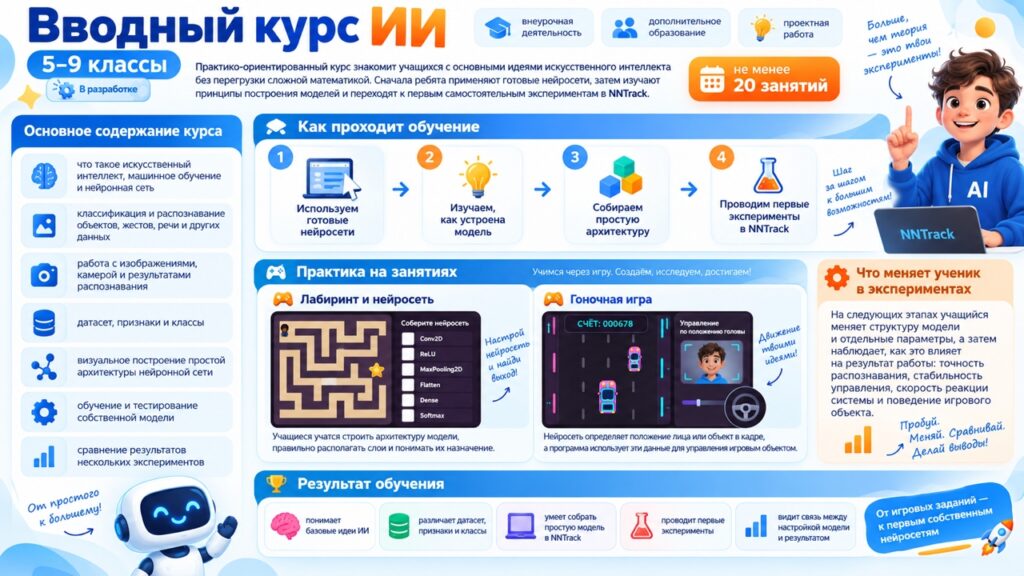
Course topics
- Artificial intelligence, machine learning, and neural networks.
- Classification and recognition of objects, gestures, speech, and other data.
- Working with images, a camera, and recognition results.
- First concepts of datasets, features, and classes.
- Visual construction of a simple neural network architecture.
- Training and testing a custom model.
- Comparing results from several experiments.
How lessons work
Every lesson includes hands-on work that helps students reinforce concepts through games or experiments. They immediately put theory into practice: controlling game objects with a neural network, experimenting with model architectures, changing parameters, and observing how those changes affect the result.
For example, a neural network detects a face's position or another object in a frame. The program then uses that data to control an in-game object, such as a racing car on a track.
| Software | Licenses | Description |
|---|---|---|
| NNTrack neural network design, training, testing, and export software, Russian Ministry of Digital Development registry extract No. 13372 | One license per workstation (PC); the recommended quantity matches the number of PCs at the institution | NNTrack is a tool for building, training, testing, and exporting neural networks. |
6. AI textbook workshops, grades 7–8
This program includes 10 workshops accompanying an artificial intelligence textbook for grades 7–8.
Each workshop shows how AI is used across industries and professions. Students solve applied problems related to agriculture, manufacturing, transport, the environment, and other parts of the Russian economy, and see where and why AI can be used. They apply what they learn by creating and training models in NNTrack. For example, they can build a neural network to identify plant diseases, create a weather forecasting model, classify objects, or explore data and compare the results from different models.
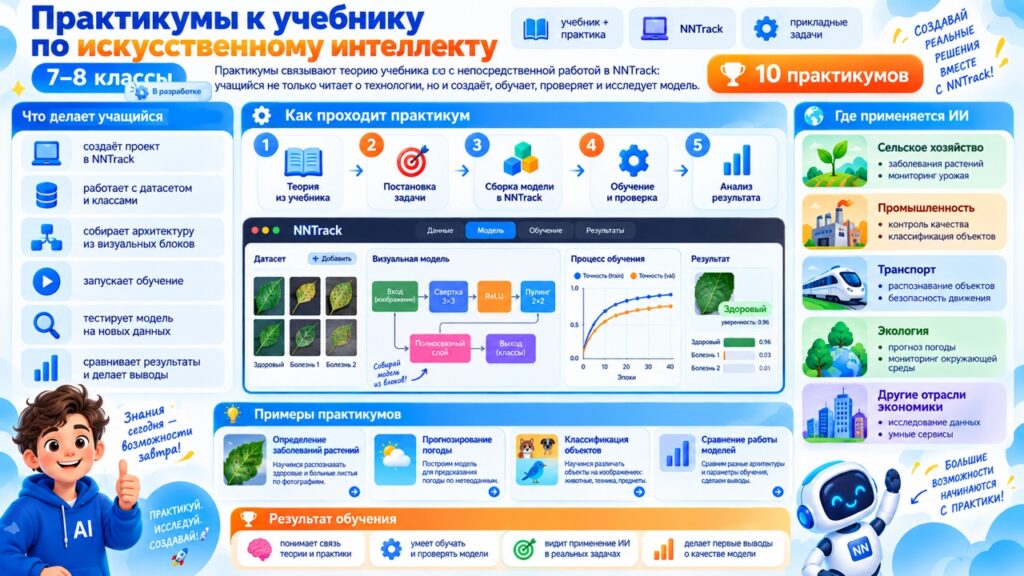
What students do in the workshops
- Create a project in NNTrack.
- Work with a dataset and classes.
- Assemble an architecture from visual blocks.
- Start model training.
- Test the model with new data.
- Compare results and assess model quality.
| Software | Licenses | Description |
|---|---|---|
| NNTrack neural network design, training, testing, and export software; Trekikod software, Russian Ministry of Digital Development registry extracts Nos. 13372 and 31062 | One license per workstation (PC); the recommended quantity matches the number of PCs at the institution | NNTrack is a tool for building, training, testing, and exporting neural networks. Trekikod is a visual environment for block programming, working with sprites, and controlling robots. |
7. AI and robotics, from age 12
This course combines robotics and artificial intelligence for students aged 12 and over. Students work in Robotrack IDE with the Robotrack Basic Advanced kit and Artintrek computing module. They run neural networks directly on a robotic model: the robot receives data, recognizes objects, makes a decision, and performs an action.
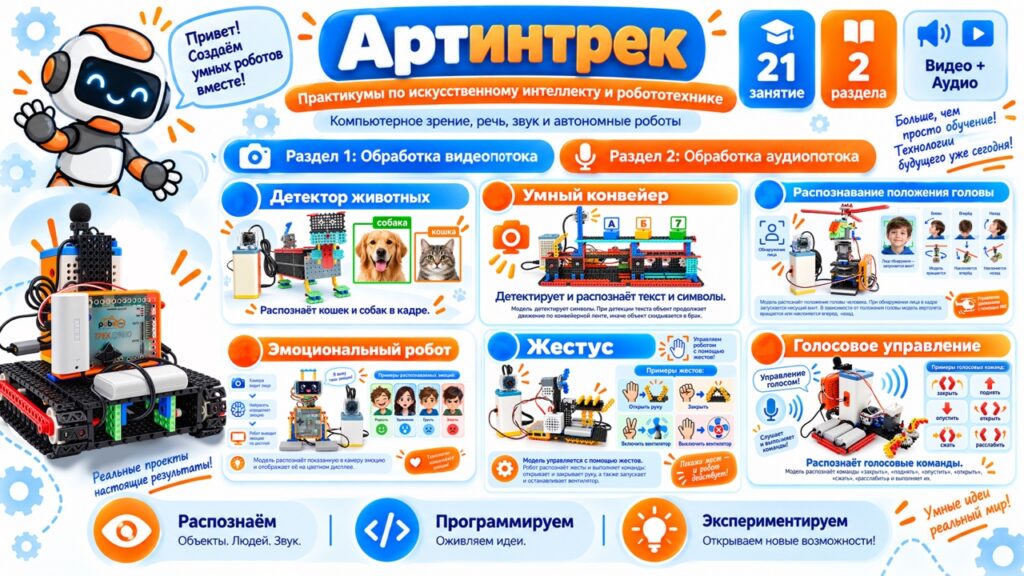
Autonomous robotic models
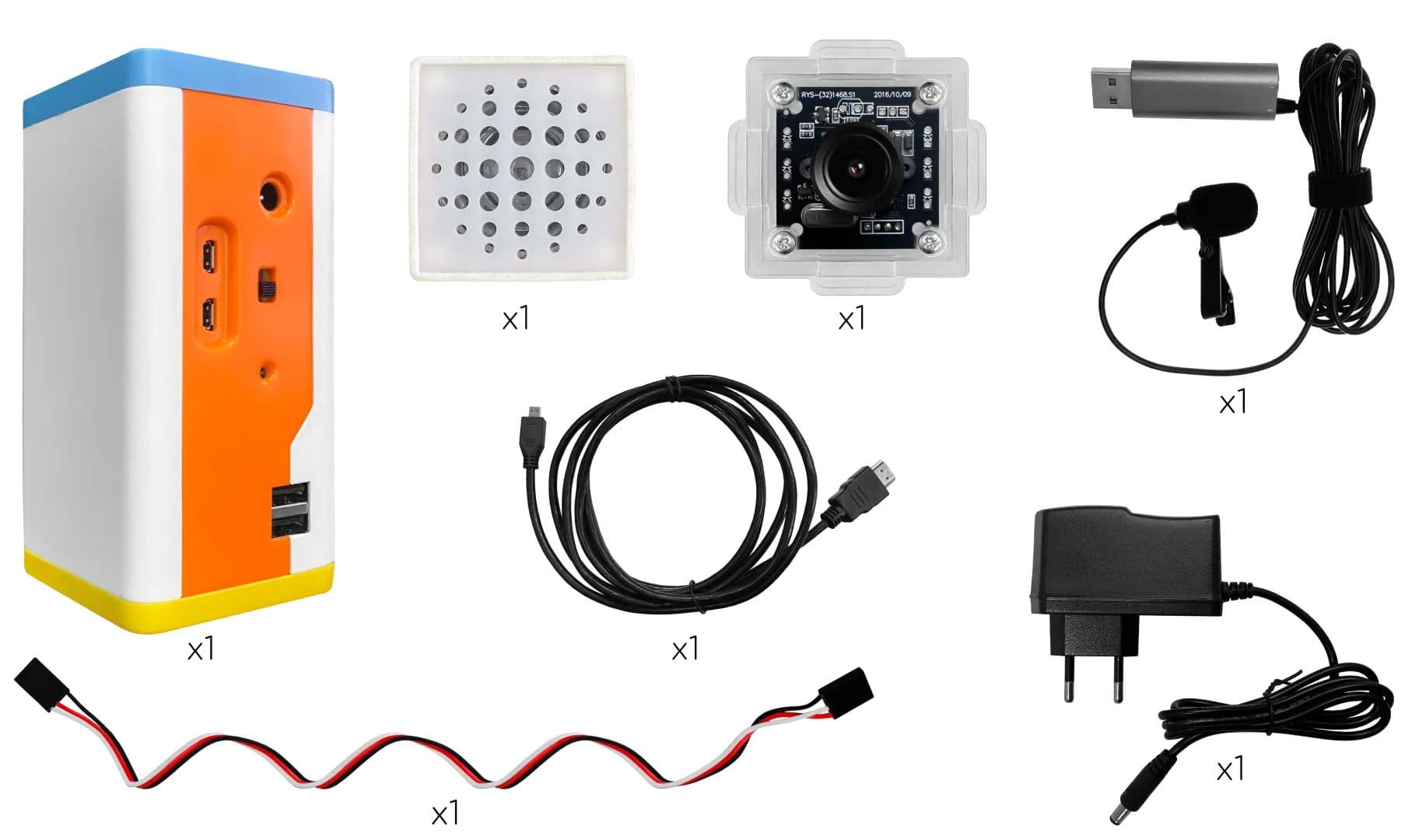
Artintrek is a computing module with hardware acceleration for neural network calculations. A camera or another data source sends information to the module; the network runs on the robot, and its output goes to the Trekduino controller. The controller operates motors, servos, and other actuators. The completed model does not need to stay connected to a computer.
Course content
The curriculum includes 21 lessons: the first 15 focus on video processing, and the remaining six cover audio processing and voice technologies.
- Image classification, MNIST, and object recognition.
- Text detection and recognition.
- Face and keypoint detection.
- Face, gesture, and emotion recognition.
- Voice commands and sound recognition.
- Emotion recognition in speech.
- Voice-controlled robots and smart home scenarios.
- An introduction to natural language processing (NLP).
- Creative and final projects with independently assembled models.
| Equipment | Recommended quantity for a group of 10 | Description |
|---|---|---|
| Robotrack Basic Advanced robotics kit, Russian Ministry of Industry and Trade registry extract No. 10587203 | 5 | Basic Advanced is a kit for building and programming robots and mechanisms of varying complexity. |
| Artintrek Basic educational AI (neural network) suite, Russian Ministry of Industry and Trade registry extract No. 10299110 | 2 | Artintrek Basic is a kit for using neural networks to process video and audio in robotics projects. |
| Trekikod software, Russian Ministry of Digital Development registry extract No. 31062 | One license included with each kit at no extra charge | Trekikod is a visual environment for block programming, working with sprites, and controlling robots. |
| NNTrack neural network design, training, testing, and export software, Russian Ministry of Digital Development registry extract No. 13372 | Two licenses included with each Artintrek Basic suite at no extra charge | NNTrack is a tool for building, training, testing, and exporting neural networks. |
8. Advanced AI, grades 10–11
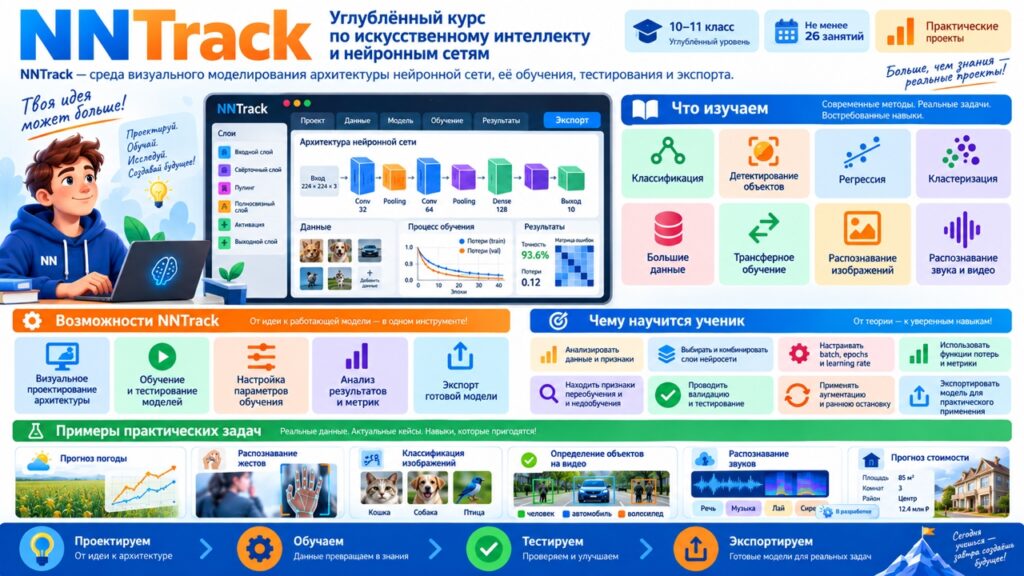
The advanced NNTrack course for grades 10–11 includes at least 26 lessons and covers key areas of machine learning and neural network development. It can be used in computer science classes, extracurricular activities, and project work. Students tackle classification, clustering, and regression problems; collect and prepare data; identify features; choose a suitable model type; and design its architecture.
In practical work, students configure training parameters, train and test models, analyze metrics and experiment results, compare architectures, and investigate how changes affect model quality. Topics include convolutional and recurrent networks, object detection, transfer learning, big data, and exporting completed models. NNTrack lets students visually build sequential and branching architectures, adjust layer hyperparameters, use pretrained models, view training charts, assess model quality, and run comparative experiments.
What students learn in NNTrack
The course covers:
- Classification and convolutional neural networks.
- Object detection and YOLO-family models.
- Regression and tabular data analysis.
- Clustering.
- Principles of working with big data.
- SimpleRNN, LSTM, and GRU recurrent neural networks.
- Transfer learning and pretrained VGG, ResNet, and MobileNet architectures.
- Data augmentation and methods for preventing overfitting.
- Validation, loss functions, metrics, optimizers, batch size, and number of epochs.
- Testing models, comparing results, and interpreting them.
- Exporting trained models for further use.
Learn about NNTrack software for neural network learning and development
| Software | Licenses | Description |
|---|---|---|
| NNTrack neural network design, training, testing, and export software, Russian Ministry of Digital Development registry extract No. 13372 | One license per workstation (PC); the recommended quantity matches the number of PCs at the institution | NNTrack is a tool for building, training, testing, and exporting neural networks. |
NNTrack integrations
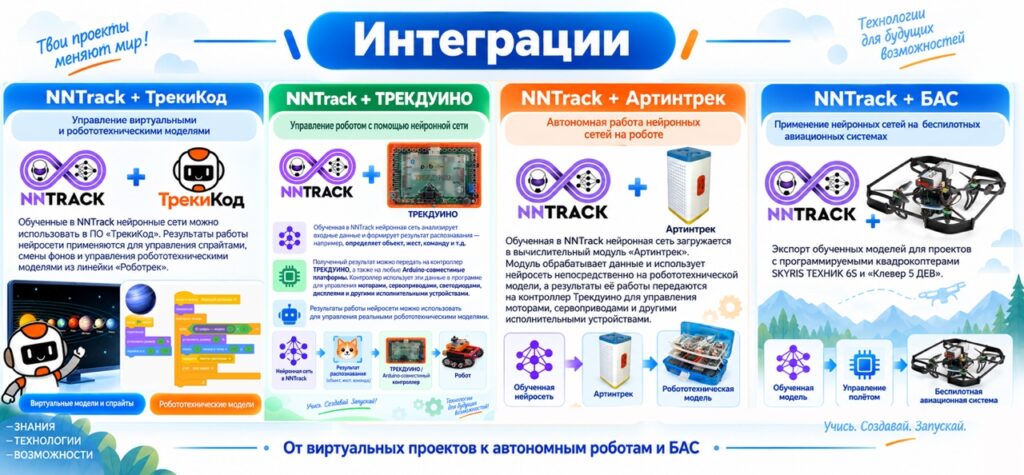
NNTrack + Trekikod
Control of virtual and robotic models
Neural networks trained in NNTrack can be used in Trekikod. Their outputs can control sprites, change backgrounds, and operate robotic models in the Robotrack product line.
NNTrack + Trekduino
Controlling a robot with a neural network
A neural network trained in NNTrack analyzes input data and produces a recognition result, such as an object, gesture, or command.
The result can be sent to a Trekduino controller or any Arduino-compatible platform. The controller uses it in a program to operate motors, servos, LEDs, displays, and other actuators. Neural network outputs can therefore control real robotic models.
NNTrack + Artintrek
Autonomous neural networks on a robot
A neural network trained in NNTrack is loaded onto the Artintrek computing module. The module processes data and runs the network directly on a robotic model. Its output is sent to the Trekduino controller to operate motors, servos, and other actuators.
NNTrack + UAS
Neural networks in educational unmanned aircraft systems
Trained models can be exported to projects with programmable SKYRIS TECHNIC 6S or Klever 5 quadcopters and similar aircraft. This integration transfers the trained model into a UAS project for computer vision and autonomous behavior tasks.
Teaching support
The educational line includes ready-to-use workshops, presentations, lesson plans, curricula, and instructions for the software and equipment. These materials can be used in lessons, extracurricular activities, supplementary education, and project work.
- Ready-made lesson and workshop scenarios.
- Teaching materials for educators.
- Step-by-step instructions for Trekikod, Robotrack IDE, and NNTrack.
- Projects with virtual objects, robots, and UAS.
- Preparation for specialist project competitions and hackathons.
| Learning pathway outcome Students progress from first projects with ready-made neural networks to independently creating, training, investigating, and applying their own artificial intelligence models. |
|---|
AI catalogue
Learn about NNTrack software for neural network learning and development
Artificial intelligence products
Teaching and learning sets
Designing and Training Convolutional Neural Networks in NNTrack Course
Learn more