
Technical specifications
- Supply voltage: 5 V
- Channels: 2
- Interrupter type: optical slotted sensor
- Shaft rotation: unlimited
- Minimum measurable angle: 5 degrees
Description
An encoder is useful when you need to rotate a shaft by a specified angle or number of turns and the servo's 180-degree range is not enough. Encoders are often used to measure the distance traveled by a robot: they are attached to the motors and measure how far the wheel shafts turn.
Inside the housing, a slotted opaque disk rotates between two optical sensors. Each sensor has its own output, giving the module two channels. As the disk turns, its slots trigger the channels in sequence. Their relative states indicate the direction of rotation. See more about encoders.
Use
Connection
The encoder uses two standard 3-pin connectors connected to IN ports on the Trackduino controller. Each encoder needs two free ports, one for each channel. Up to four encoders can be connected.
Choose which wire is channel A and which is channel B. The mapping is not fixed; select it to suit your setup. When readings are taken, rotation from channel A toward channel B is treated as the positive direction.
Programming
The required blocks are in the “Sensors” block group. First, initialize each connected encoder in the Setup section: use the “Set up encoder” block in visual programming or call setupEnc(int encoder, int chA, int chB) in text mode.
Encoder angle variables are updated using interrupts. Their readings continue to change even while the program is busy—for example, during a delay—so you can poll them infrequently without missing sensor events.
The encoder resolution is 5 degrees. Values returned by the reading block are always multiples of 5 degrees (−20, −15, −10, −5, 0, 5, 10, …). The counter overflows at ±2,147,483,645 degrees (about six million turns); the sensor itself has a shorter service life.
| Block and generated function | Description |
|---|---|
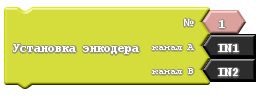 void setupEnc(int encoder, int chA, int chB) | Initializes an encoder and tells the program which ports it uses. Call it in Setup for each connected encoder.int encoder — identifier used to refer to this encoder; int chA and int chB — IN ports connected to channels A and B. |
 long getEncDegrees(int encoder) | Returns the selected encoder's angle in degrees.int encoder — encoder identifier. |
 void setEncToZero(int encoder) | Resets the selected encoder's counter to zero.int encoder — encoder identifier. |
Project example
Send readings from two encoders to the serial port
Generated code:
void setup()
{
  setupEnc(1, IN1, IN2);
  setupEnc(2, IN3, IN4);
  Serial.begin(115200);
}

void loop()
{
  Serial.print("Encoder #1:");
  Serial.print(getEncDegrees(1));
  Serial.println();
  Serial.print("Encoder #2:");
  Serial.print(getEncDegrees(2));
  Serial.println();
  delay( 1000 );
}